Apply · 2.13
Dispatcher terminal and control-centre integration
Time: about 10–13 minutes including the task; estimate
Guiding question: What must Niko's workstation know and display about the communication service?
Learning objective: You follow Niko's call intention from the workstation to a usable service.
Prerequisites: Previous lessons through 2.12, particularly the case file developed there.
The workstation and the central platform
A dispatcher terminal is the user workstation for the intended operational communication. It includes user interface and audio facilities together with the integrated voice application. It is not automatically a single device: application parts and central functions may be distributed. The course selects a specific voice path for Niko rather than deriving a universal architecture from the word “terminal”.
The Voice Application Subsystem (VAS) groups voice-application functions. In the selected TSAPP voice profile, the application contains the MCX client functions. SIP session control and MCPTT service functions sit behind it in the communication relationship. Niko does not directly operate a UPF or radio channel. His application translates the call intention into the defined service procedures. [S06, clause 24.3]
Follow Niko's sign-in and shift handover
Niko signs in as a person and assumes his approved responsibility. The application displays the active role and selected communication partner. Successful service sign-in is distinguished from actual call participation and audible speech. During shift handover, it must remain clear which role is active at which workstation and how outstanding activities are handled.
After workstation restart, a saved display is not a current service confirmation. Talbahn tests sign-in, role association, new calls and the defined treatment of existing communication. A GSM-R partner also involves the IWF; its interworking state is not automatically evident from terminal status.
A visible button does not mean the train was reached
At his control-centre workstation, Niko selects the driver role for train 1234. The application accepts the button press and displays “Request sent”. Lea hears no call. Initially, this display demonstrates only an application action. It must not be read as confirmed reachability of the train.
From 2.11 you know TSAPP as the application interface to the Trackside FRMCS System. Niko's voice example retains the TSAPP variant with Tight Coupling chosen there. The TSCTRL connection explained in 2.11 applies to a controller VAS without TSAPP support. Through the selected connection, the control-centre application uses the intended communication functions. [S06, section 24.3.3] Its operational interaction logic remains a separate task. The FFFIS describes the interface, not a complete set of working rules for Niko.
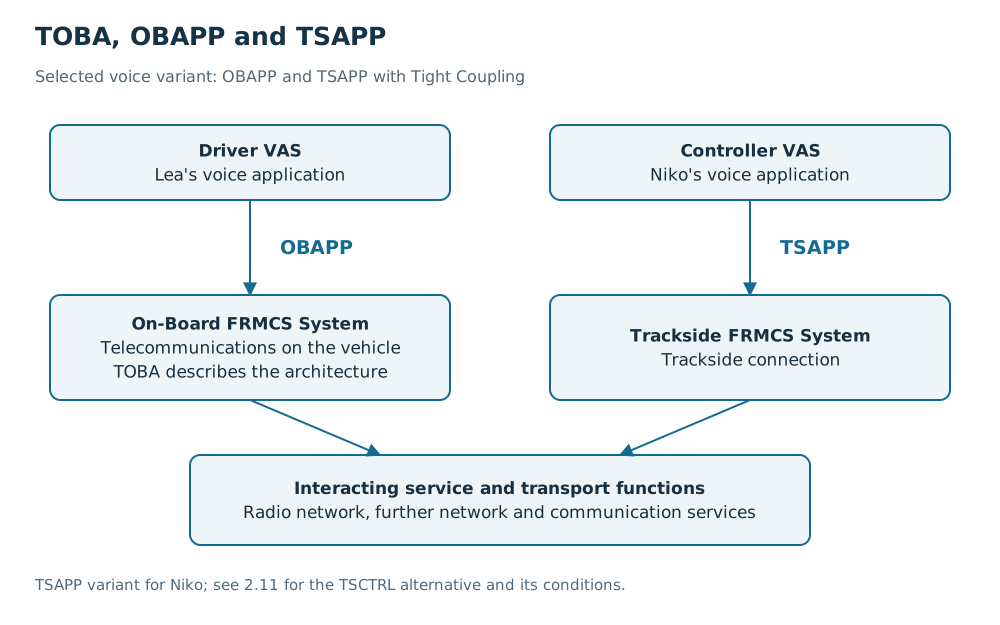
From user intention to observable result
Here, integration means bringing applications and communication functions together so their interaction fulfils the defined purpose. It includes compatible interfaces, states and failure responses. A physically connected control centre is therefore not yet fully integrated.
Several states must be distinguished for Niko's role-based call:
| State | What Niko or the evidence may establish |
|---|---|
| User action accepted | The application has taken in the request |
| Service request handled | The communication service processed the request within the observed scope |
| Destination assignment resolved | The selected role was mapped to an authorised destination |
| Participation or connection established | The stated communication state exists |
| Speech usable | Media and audio output fulfil the purpose being considered |
This order is a functional assessment chain, not a mandatory protocol sequence. Individual procedures may combine states or report them differently. The essential point is that the display and its demonstrated meaning agree. The distinction between signalling and media from 2.4 remains.
Role, workstation and permission
Niko is a person. His operational role determines his tasks; the workstation is technical equipment. A replacement workstation therefore does not assume his responsibility merely by being switched on.
A workstation change must establish the intended registrations, permissions and role assignments. Old sessions must not continue a conflicting responsibility without control. Takeover and conflict handling must be defined and tested. This is the same assignment need as the Lea–Amir change in 2.7.
Handle failure states together
If TSAPP is reachable but the service rejects a request, the application must process the intended feedback. Loss of the connection between application and FRMCS system requires a clear indication and defined restart behaviour. An unchanged green symbol would not meaningfully replace missing state information.
For each transition, Talbahn records which side observes it and who investigates faults. Before resending after an interruption, it must also be clear whether the previous request already took effect. Otherwise a retry can cause unwanted duplicate actions.
An operational decision, such as which alternative path to use during an incident, is defined by the responsible parties. The interface description alone does not authorise it.
Check your understanding
After Niko changes workstations, the new screen shows “connected”, but calls still arrive at the old workstation. Which three relationships do you check?
Model answer
First, I check which technical connection the display actually confirms. Second, I check registration, permissions and the current assignment of Niko's role. Third, I compare service and session states at the old and new workstations with the intended takeover procedure. A reachable TSAPP interface does not prove a correct role change.
What to remember
A control-centre indication is only as informative as the state it actually confirms.
Your Talbahn case file
Add Niko's workstation change with expected indication, role takeover, failure state and responsible party.
Sources
S06 · UIC FRMCS SRS AT-7800
Version: 2.1.0, 30 April 2025 · Checked: 2026-10-11
Scope: System requirements, architecture, service/transport interaction and mobility. Functional Alias: 11.6/21.3; voice profiles: 24.2.3.3 and 24.3.3.2–4; TSCTRL: 6.4.1.3.
Limitations: The project baseline must specify the applicable parts.
Used in: 1.3, 2.4, 2.7, 2.9, 2.11, 2.13, 2.15, 2.16, 2.17, 2.18, 2.19, 3.2, 3.3, 3.16
Your progress is stored in this browser on this device.